

Want to insert Advanced Custom Fields (ACF) values directly into a rich text area instead of being limited to a single dynamic tag? This guide explains how to output ACF values inside any WordPress editor using a lightweight, professional snippet approach.
Stop building with restrictions. Start building with logic. 🏎️💨
Why This Matters: Breaking the “One-Widget” Barrier 🛡️
By default, most page builders (like Elementor) allow only one dynamic tag per element. This forces you into “Widget Bloat” – adding three different heading widgets just to display three different fields.
The “New Way” Advantage:
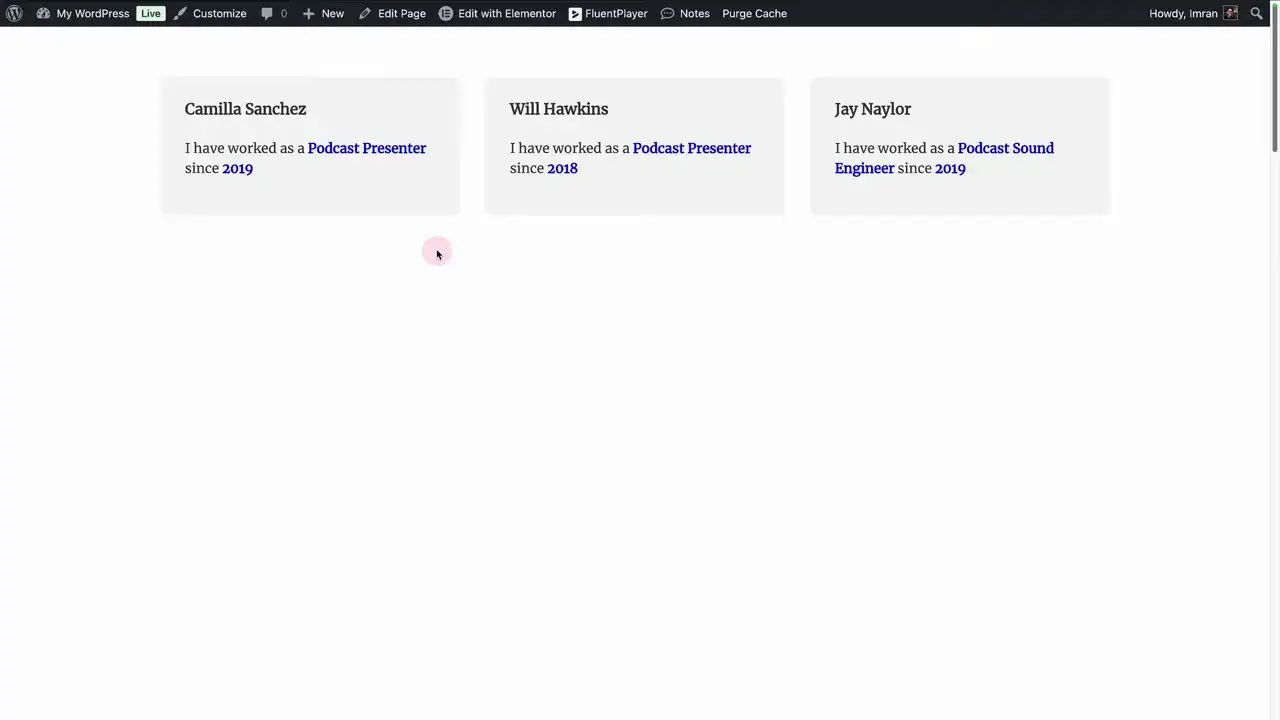
Combine Multiple Fields: Drop “Role,” “Location,” and “Start Date” into a single, cohesive paragraph. 📝
Clean DOM: One text widget instead of five. Faster load times. Better SEO. 🏎️
Total Control: Mix static text and dynamic data exactly where you want it.
Prerequisites 🔑
Before architecting this workflow, ensure you have:
ACF Installed: Fields created and populated.
Field Names Ready: You need the Name (slug), not the Label.
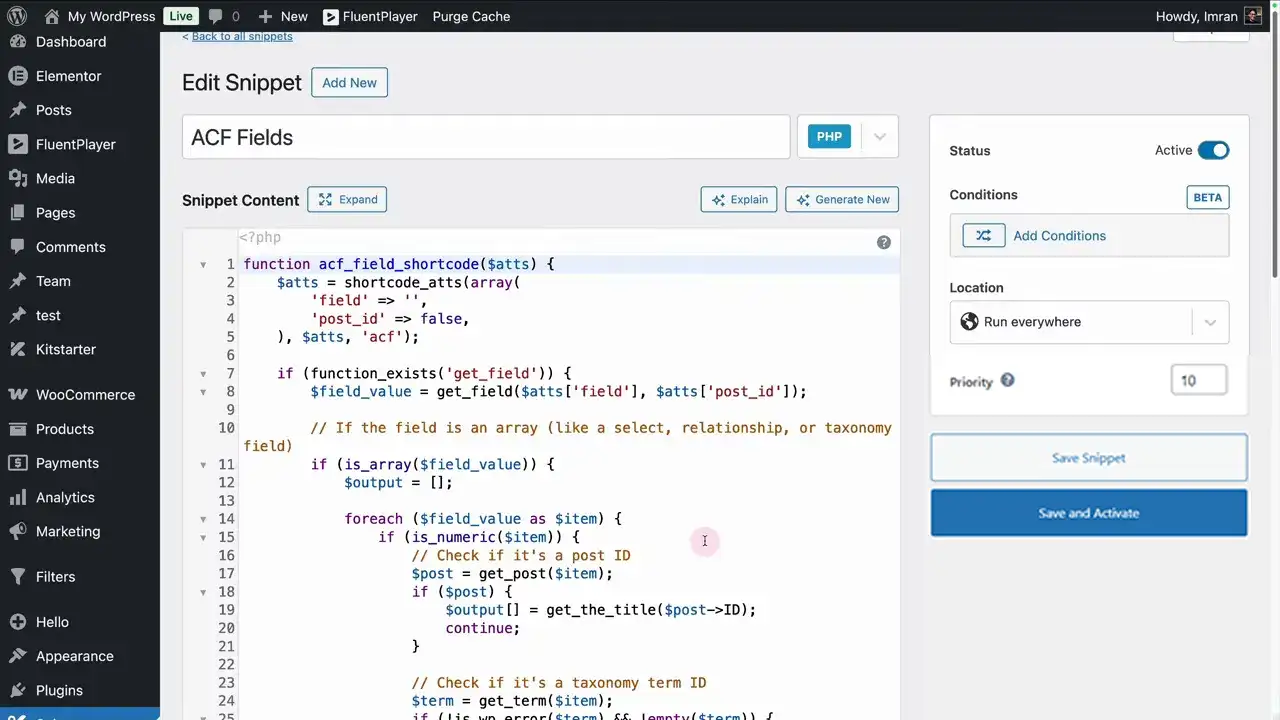
Code Snippets Pro: To register the shortcode logic safely without hacking your theme.
Step-by-Step: Enabling ACF Placeholders
1. Deploy the Snippet 🛡️
You need a snippet that registers a shortcode to fetch ACF data.
Action: Add a new PHP snippet in your dashboard.
Status: Ensure the snippet is Active. An inactive snippet is just dead code.
2. Identify the “DNA” (Field Names) 🔍
In ACF, every field has a Label (for humans) and a Name (for the machine).
The Rule: The “New Way” relies on precision. Use the Field Name (e.g.,
member_role, not “Member Role”).
3. Use the Professional Syntax ✍️
Once your snippet is active, you can drop ACF values into any Text Editor widget using this syntax:
Example in a single paragraph:
“Our Lead Architect, , has been with the firm since .”
Where This Logic Shines 💎
Elementor Loop Grids: Create high-performance product or team cards.
Bio Sections: Build complex, multi-field paragraphs that look hand-written.
Product Specs: List multiple attributes (Weight, Color, SKU) in a single, scannable block.
Common Mistakes (The “Old Way” Pitfalls) 🛑
Using the Label: If you use “Member Role” instead of
member_role, the server won’t find the data.Snippet Inactivity: If the shortcode shows as plain text on the front end, your snippet isn’t active.
Empty Fields: If a field is empty, the placeholder will render blank. Architect your sentences so they still make sense if a value is missing.
Get your snippet here
					function acf_field_shortcode($atts) {
    $atts = shortcode_atts(array(
        'field' => '',
        'post_id' => false,
    ), $atts, 'acf');

    if (function_exists('get_field')) {
        $field_value = get_field($atts['field'], $atts['post_id']);

        // If the field is an array (like a select, relationship, or taxonomy field)
        if (is_array($field_value)) {
            $output = [];

            foreach ($field_value as $item) {
                if (is_numeric($item)) {
                    // Check if it's a post ID
                    $post = get_post($item);
                    if ($post) {
                        $output[] = get_the_title($post->ID);
                        continue;
                    }

                    // Check if it's a taxonomy term ID
                    $term = get_term($item);
                    if (!is_wp_error($term) && !empty($term)) {
                        $output[] = $term->name;
                        continue;
                    }
                }

                // If it's not a number, just add the value
                $output[] = $item;
            }

            return esc_html(implode(', ', $output));
        }

        // If it's a single post ID, get the post title
        if (is_numeric($field_value)) {
            $post = get_post($field_value);
            if ($post) {
                return esc_html(get_the_title($post->ID));
            }

            $term = get_term($field_value);
            if (!is_wp_error($term) && !empty($term)) {
                return esc_html($term->name);
            }
        }

        return esc_html($field_value);
    }

    return '';
}
add_shortcode('acf', 'acf_field_shortcode');

Huge thanks to Imran Siddiq - Web Squadron for architecting this tutorial!
❓FAQ: ACF in the Text Editor
Do I need Elementor Pro for this?
No. By using the snippet approach, you bypass the need for expensive “Dynamic Tag” integrations. This is pure, lightweight WordPress logic. 🏗️
Can I use this in the Block Editor (Gutenberg)?
Yes. This shortcode-based method works anywhere WordPress processes shortcodes, including the standard Paragraph block. 🧱
Why isn't my field showing up?
Check your spelling and ensure the snippet is active. If you are using a caching plugin, clear it. Logic requires a clean path to the database. 🏎️💨