
Be the first to try new Features and help shape the next release!
Join the Code Snippets beta and run upcoming builds before they go stable. Test on a staging site, send feedback without leaving your WordPress dashboard, and watch real-world findings turn into a better release.
Why beta testing matters
Automated tests cover a lot. What they can’t do is reproduce every combination of host, theme, plugin, PHP version, and site configuration out there. That’s where you come in.
Beta testers run upcoming builds on staging sites and find the problems that only show up in real WordPress environments. A confusing label, an unexpected error, a workflow that takes longer than it should: all of it is useful.
We treat beta testing as part of the release process, not an afterthought. Your feedback decides what gets fixed before the stable version ships.
What happens to your report
Nothing you send disappears into a void. Every report follows the same path:
- Human triage. The development team reads every report, along with any environment details you include. No bots harmed here, no auto-close.
- Investigate. If possible, we reproduce the potential issue based on the information you gave us.
- Prioritise. Confirmed issues get ranked by impact, then scheduled.
- Fix and credit. The fix lands in a later build, and when your report leads to one, we credit you in the release notes.
What you get as a tester
- Early access. Upcoming features before the stable release.
- A say in what ships. Your feedback shapes the final version and what we build next.
- Release-note recognition. Reports that lead to fixes can earn your name in the notes for that version.
- Swag Store credit. Help us resolve an issue we didn’t know about, and you may receive a Swag Store credit voucher as a thank you.
How to get beta testing, quick and easy
Testing the latest beta takes a few steps, all inside your WordPress dashboard.
Set up a staging site
Betas belong on staging, never on production. Most hosts offer one-click staging.
Open the version settings
Go to Code Snippets, then Settings, then Advanced.
Select the beta
Under Switch Version, pick the available beta release from the drop-down. Not listed? Click Refresh Versions first.
Save
Let WordPress complete the version switch.
On Pro? Update both
Test the matching Core and Pro beta builds together.
Going back is just as easy: the same Switch Version control returns you to stable at any time.
Feedback lives inside the plugin
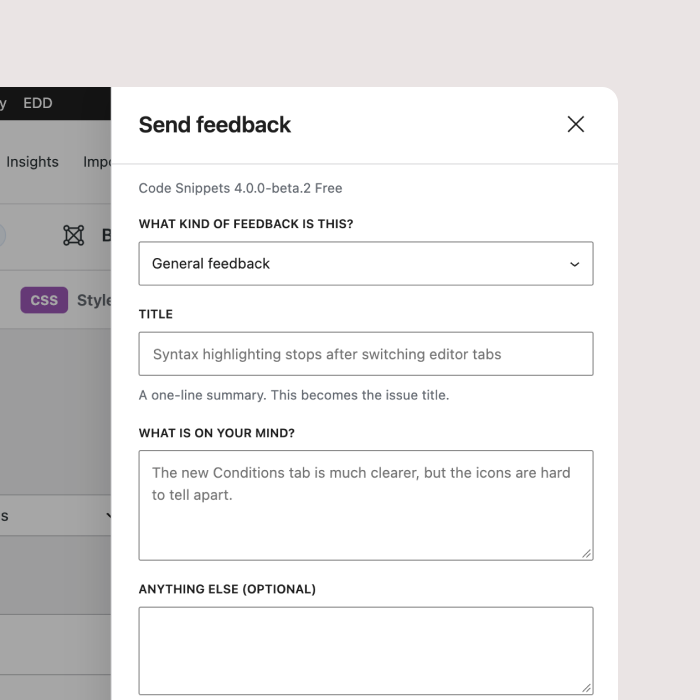
The v4 beta has a feedback reporter built straight into the Code Snippets admin screens, ready for bug reports, feature requests, and general product feedback.
It can also bundle in the context that makes reports useful: your site address, contact details, active plugins, and the version you’re testing. You describe the problem once, and the team gets what they need to reproduce it.
- Go to Code Snippets, then Settings, then Advanced.
- Enable the Feedback Reporter. Read the information shown with the setting, then save.
- Click Send Feedback on any Code Snippets admin screen whenever you spot something.
Can’t reach your admin screens? The website feedback form still works as a fallback.
Frequently asked questions
Can I start testing without a Pro license?
Yes. The beta is available to both Free and Pro users, and both editions need testing. The Feedback Reporter automatically includes your edition and version when you submit a report. Finding bugs requires no paid subscription.
Is the beta safe to run on my live site?
How do I send feedback?
What happens after I submit a report?
What should I report?
Can I go back to the stable version?
Will I know when my bug is fixed?
Ready to run the next release?
Join the Code Snippets beta, run upcoming builds on a staging site, and send feedback without leaving your WordPress dashboard.