If your WordPress media library feels bloated, you’re not alone. Large, unoptimized images are one of the primary causes of slow load times and poor Core Web Vitals scores. While many plugins promise quick fixes, professional developers prefer a more refined approach that offers ⚡ more control, ⚡ less overhead, and ⚡ zero bloat.
That’s where PixRefiner 3.5 comes in. Operating directly within Code Snippets Pro, it functions as a high-performance image optimization engine. It gives you full control over your media workflow without the need to install yet another heavy, third-party plugin that clutters your dashboard and slows down your backend.
🚀 What’s New in PixRefiner 3.5
While version 3.4 introduced core conversion tools, Version 3.5 is a complete performance overhaul built for enterprise-level scaling. It introduces Dynamic Memory Management, which allows the engine to detect server limits in real time to prevent 504 Gateway Timeouts. This is paired with 📉 Lazy-Check Database Logic, reducing unnecessary queries by up to 40% when scanning large media libraries.
Beyond speed, the update focuses on reliability and modern compatibility:
- 🧠 Smart Error Recovery: Automatically skips corrupt files and continues batch processing without crashing your site.
- 🔐 Granular Metadata Control: You can now remove GPS data for privacy while selectively keeping Copyright and Creator tags to maintain SEO value.
- 📱 HEIC / HEIF Support: Native handling for modern iOS uploads, ensuring mobile photos are optimized the moment they hit the server.
🛠 Why Convert Images to WebP or AVIF?
Modern image formats outperform legacy JPG and PNG files in every meaningful metric. By switching to WebP or AVIF, you gain superior compression, allowing for significantly smaller file sizes without a visible loss in quality. This directly translates to a boost in your Largest Contentful Paint (LCP) scores—a critical ranking signal for Google. Additionally, reducing your total library size means you stop paying for excessive hosting storage and provide a faster, more modern experience for your users.
📝 Setup: Install PixRefiner 3.5 via Code Snippets Pro
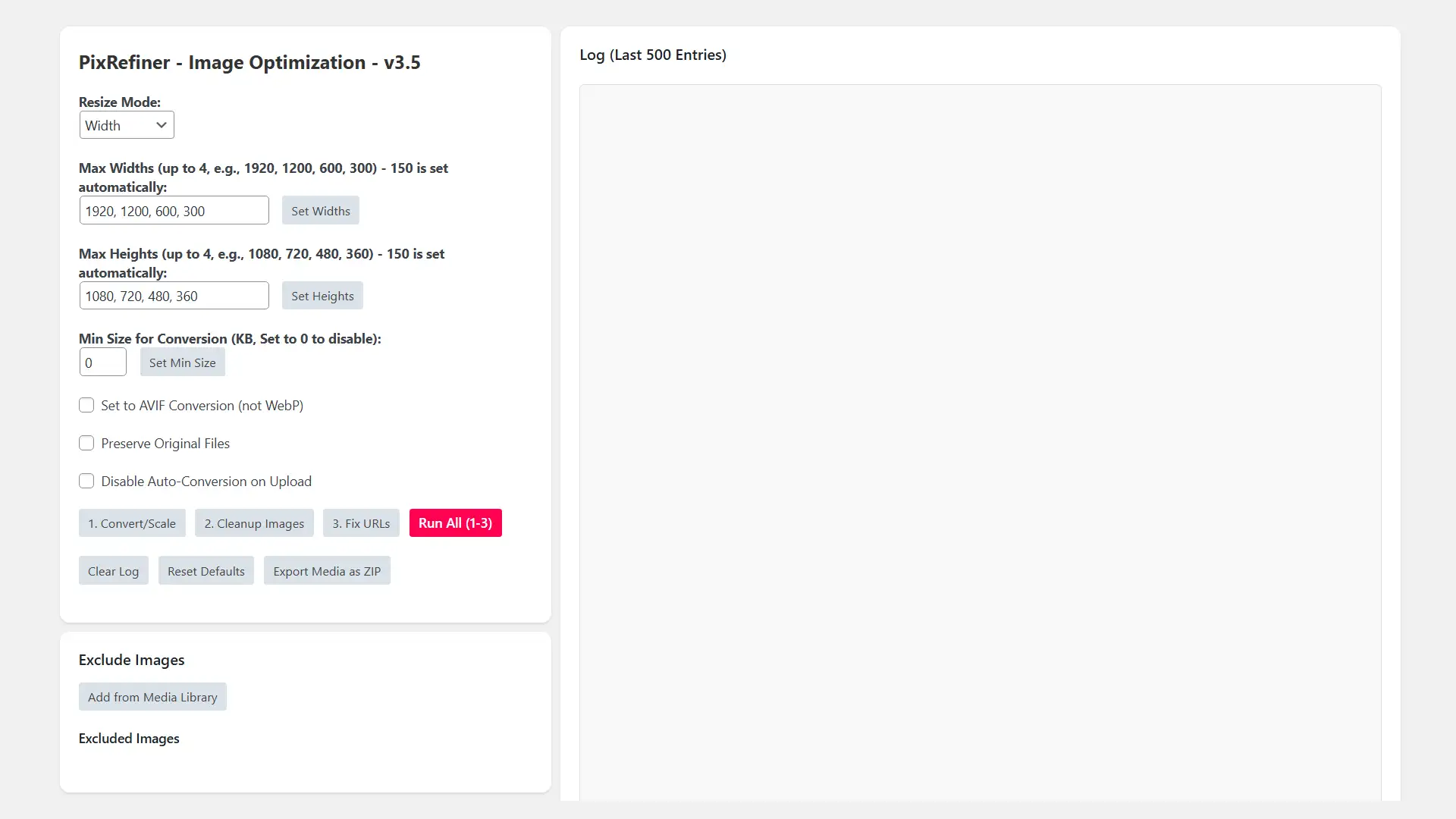
One of the best parts of PixRefiner 3.5 is the “Snippet-first” setup. There is no plugin bloat or extra UI clutter. Simply open Code Snippets Pro in your WordPress dashboard and create a new snippet titled “PixRefiner 3.5 – Advanced Image Engine.” Paste the code, set it to “Run Everywhere,” and save. You can then navigate to Media → PixRefiner to access the updated 3.5 settings panel and begin your optimization.
⚙️ Key Settings Explained
When configuring your engine, you have granular control over how your images are served. With Progressive Rendering, images appear instantly in low-res and sharpen as they load, which significantly improves the perceived speed for the visitor. For the best results, we recommend using AVIF for maximum compression or WebP for the widest browser compatibility.
The Smart Scaling feature ensures your quality is protected; PixRefiner allows you to set custom breakpoints (like 1920 or 1200) but intelligently refuses to upscale smaller originals. Furthermore, the metadata settings allow you to “strip the junk”—removing bulky GPS and camera data while retaining the essential Alt text and Creator fields that keep your images ranking in search results.
📉 Handling Large Libraries
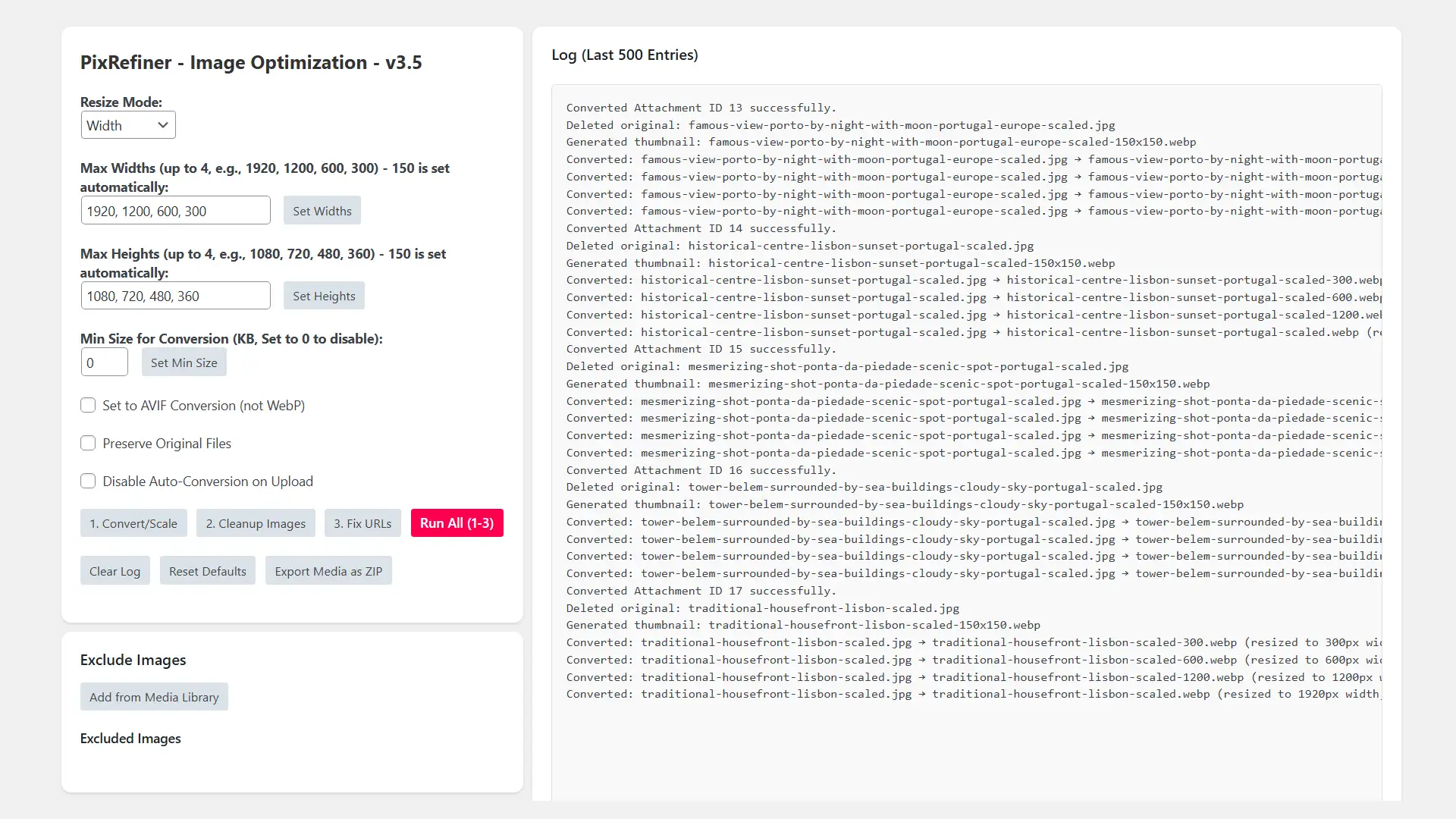
Optimizing thousands of legacy images is handled through a safe, paginated Batch Processing workflow. The system uses a Lazy-Check Scan to identify only the files that actually need work, skipping those already optimized. If the engine encounters a corrupt file, it logs the error and moves to the next, ensuring the process never stalls. For developers managing networks, the 3.5 update also features improved path detection to ensure multisite stability across all sub-sites.
✅ PixRefiner 3.5 Optimization Checklist
- 📁 Backup First: Always secure your files and database before a bulk run.
- 📐 Set Max Widths: Align your image sizes with your theme layout.
- 🧬 Choose Format: We recommend WebP for general builds and AVIF for high-performance projects.
- ⚡ Enable Progressive Loading: Give your users a faster visual experience.
- 🧪 Test 10–20 Images: Verify the quality before committing to the whole library.
- 🚀 Run Bulk Process: Execute the batch and enjoy a leaner site.
✂️ Final Thoughts
PixRefiner 3.5 is more than just a simple update; it is a professional-grade performance engine built specifically for developers who value clean architecture. By integrating this tool into your Code Snippets Pro workflow, you eliminate the need for bloated image plugins while gaining a level of control that traditional tools simply can’t match. Whether you are aiming to ace your Core Web Vitals or simply want a cleaner, faster backend, PixRefiner 3.5 provides the stability and efficiency required for modern WordPress development.