If you have content, you already have social leverage. Stop paying for AI credits to summarize what already lives in your database. 🏛️
This surgical approach lets you scan blog posts, products, or CPTs. You can create social-ready copy for X, LinkedIn, or your scheduler—without the “AI Tax.” Consequently, this is the “New Way” for agencies and freelancers to squeeze more mileage from a site without adding another subscription. 🏎️💨
What this WordPress social post generator does 🛠️
This tool extracts logic from your existing site architecture. Specifically, it works with:
- Standard blog posts
- Custom post types (CPTs)
- WooCommerce Products
- Any content with meaningful text inside it.
The Functional Advantage: Instead of relying on AI hallucinations, the tool analyzes your actual page content. Furthermore, your brand voice stays consistent because it uses your own writing. Additionally, there are no AI connections, no API usage costs, and no third-party automation required. It is simple, private, and powerful.
How it works inside WordPress ⚙️
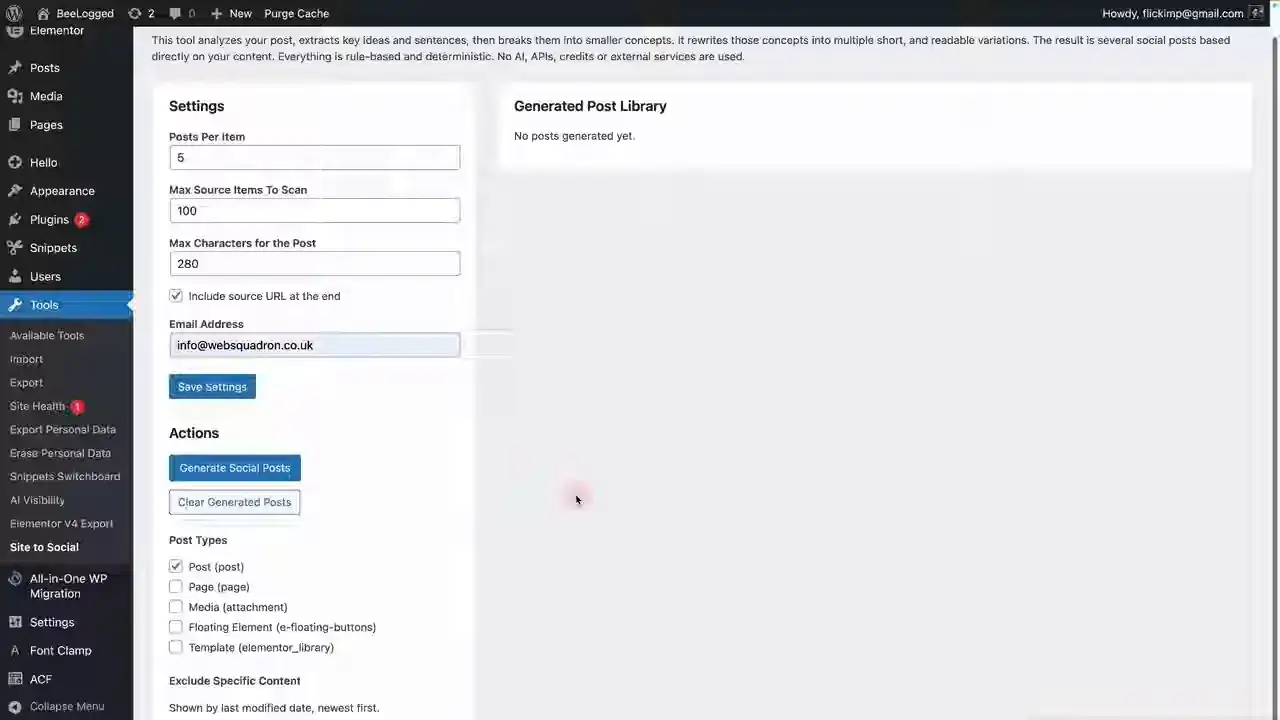
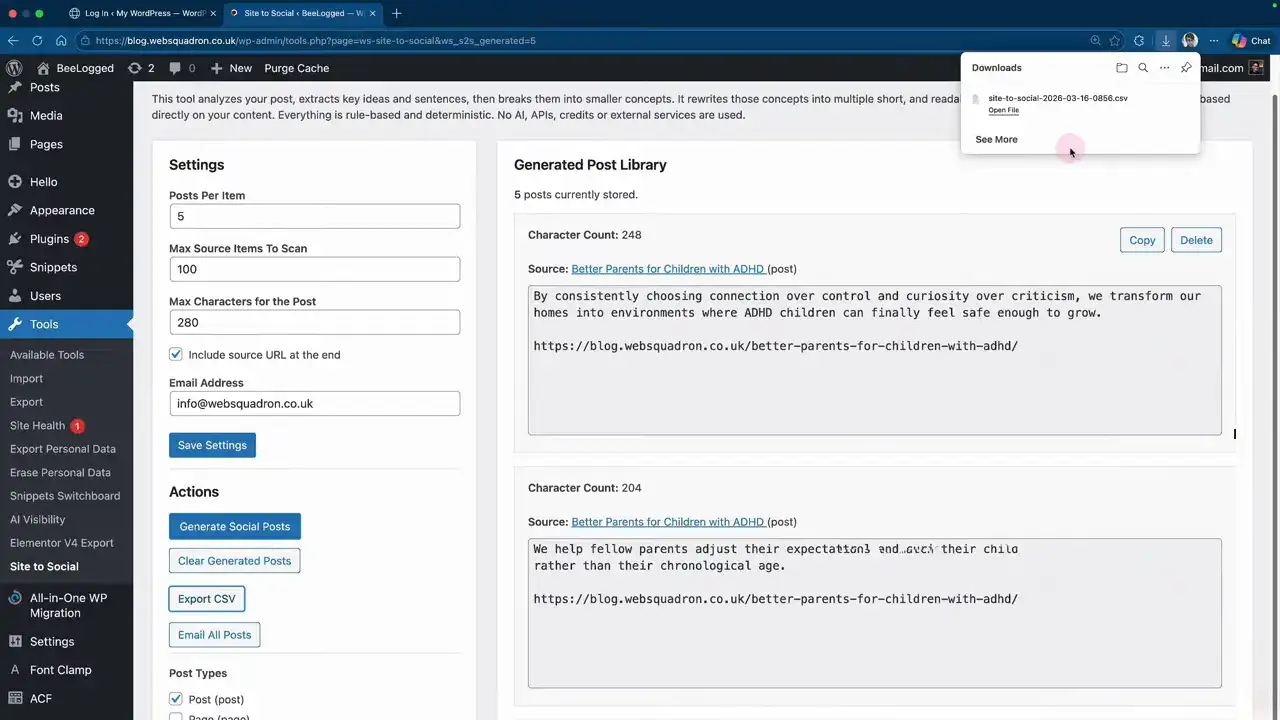
The tool sits natively in your dashboard under Tools > Site to Social. First, it scans the entire body of your post to find useful anchors and key phrases. Therefore, it provides much better depth than a simple excerpt pull.
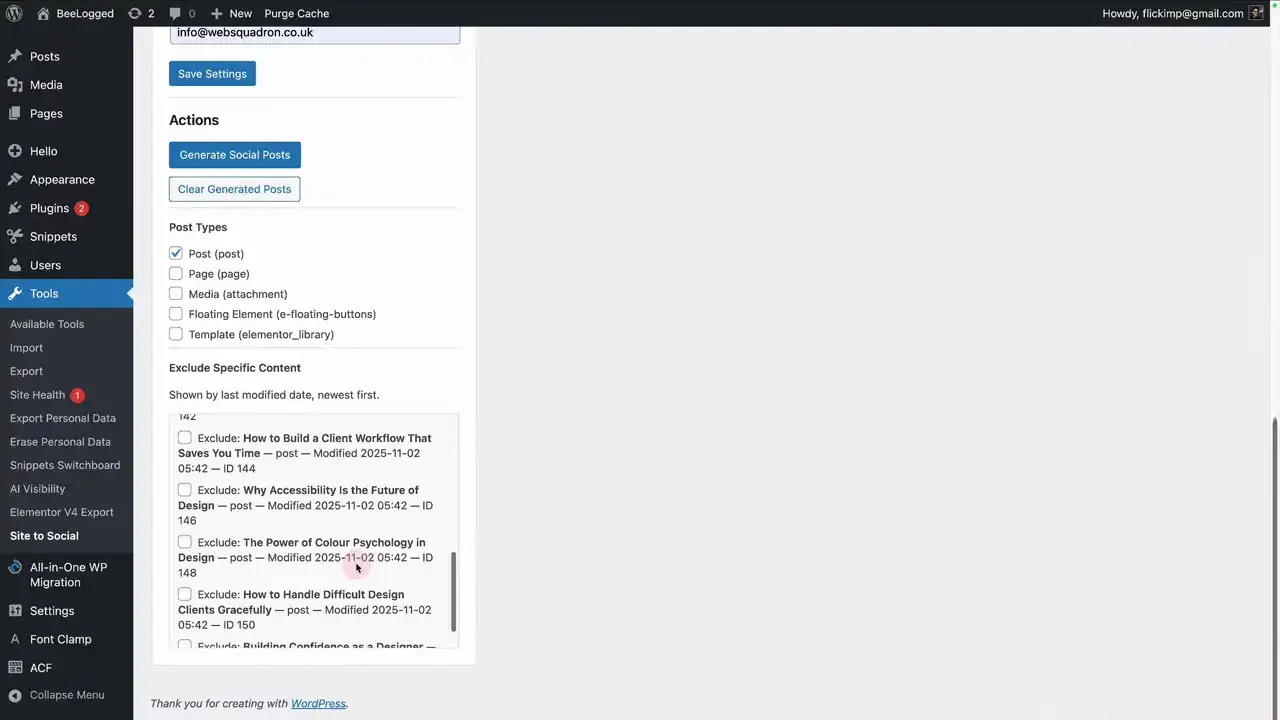
- Content Selection: Choose your post types. Your exclusions are saved for your next session. 💾
- Batch Power: Generate one post for bulk output or multiple variations from a single “meaty” article.
- Character Precision: Set a 280-character cap for X or longer limits for LinkedIn. 📏
Deploying Your Assets Surgically 📥
Once your posts are generated, you have four ways to move them. First, you can copy and paste text directly into your social platforms. Second, you can use the CSV export for bulk scheduling or team sharing. Third, you can dispatch batches to clients via email for instant approval. 📧 Finally, these snippets work perfectly as hooks for short-form video scripts.
Why the Architect Prioritizes Local Logic 🏛️
The Architect prioritizes efficiency over bloat. Because this tool runs locally, it eliminates the latency and privacy risks of external APIs. However, it is important to remember that this is a generation engine, not a publisher. Therefore, you maintain total control over the final post before it goes live. This ensures that your social presence remains high-quality and human-verified.
Maintaining Content Quality and Standards 🧩
Furthermore, the quality of your output depends on the depth of your source material. If your original article is detailed, the tool can extract more diverse hooks. Specifically, articles with clear subtopics yield the best variations. For that reason, we recommend generating smaller batches of 3-5 posts per item to maintain a premium standard across your social channels.
The Architect’s Standard: Best Practices 🏛️
- Clear Prefixes: Use prefixes like social – to keep your library searchable.
- Focused Scope: Each snippet should serve one purpose to prevent debugging friction. 🎯
- Metadata Tags: Include documentation links and author info within the comments. 🏷️
- Staging First: Always verify your code in staging before moving to production. 🏗️
- Detailed Documentation: Record exactly what each snippet modifies and why. 📑
Security & Safety Checklist 🛡️
- Pre-activation Review: Audit third-party code before hitting activate.
- Data Backups: Maintain current site backups before bulk updates. 💾
- Restricted Access: Limit snippet editing to trusted administrators only. 🔐
- Version Control: Manage bundles to track history and revert if needed. 🔄
- Live Traffic Guard: Never run experimental code on a live site. 🚫

Huge thanks to Imran Siddiq - Web Squadron for architecting this tutorial!
❓FAQ: Social post generator
Can WordPress generate social media posts from existing blog posts?
🛠️ Yes. This tool scans your content and generates social-ready text based on the page content. It is a content repurposing method, not a publishing system.
Does this require ChatGPT, Claude, or any AI API?
🚫 No. This setup is specifically designed to work without AI connections or API credit usage.
Will it automatically post to X, LinkedIn, or Facebook?
🧊 No. It generates the text only. You still need to copy, export, or email the posts manually.
Can it work with WooCommerce products or custom post types?
🛍️ Yes. As long as those content types are selected in your settings, it handles them perfectly.
Can I choose the length of the social posts?
📏 Yes. You can set a maximum character count, such as 280 for X.
Can I export the generated posts?
📥 Yes. Posts can be exported as a CSV file or sent by email, which is helpful for client workflows.
Why are some generated posts similar?
🧩 Repetition happens if you ask for too many variations from a short article. For best results, use “meaty” source material.